

Users
Users gives your app a sign-in system and a place to manage its accounts. It uses AWS Cognito underneath, with APIs and SDKs for connecting it to your app.
You can start with email and password, then evaluate options such as Google, magic links or passkeys when your deployment has them enabled. Your app uses its own deployment's settings; your users don't sign in through SaaSLayer's company account.
Start with a small working flow
| Step | Guide | What you'll do |
|---|---|---|
| 1 | Get started | Find your deployment's API URL and check that your app can connect. |
| 2 | Add sign-in | Understand the sign-in flow and connect a form or UI component. |
| 3 | Manage users | Create or invite people, look up accounts and handle account changes. |
The React and JavaScript SDKs are Preview and not yet published to npm. The guides label SDK examples accordingly; the discovery and CLI steps can be followed without installing those packages.
Identity vs permissions
Users answers “who is signed in?” It handles identity, sign-in and account recovery.
Permissions answers “what can this person do?” It handles rules such as “team members can read projects, and owners can invite people.”
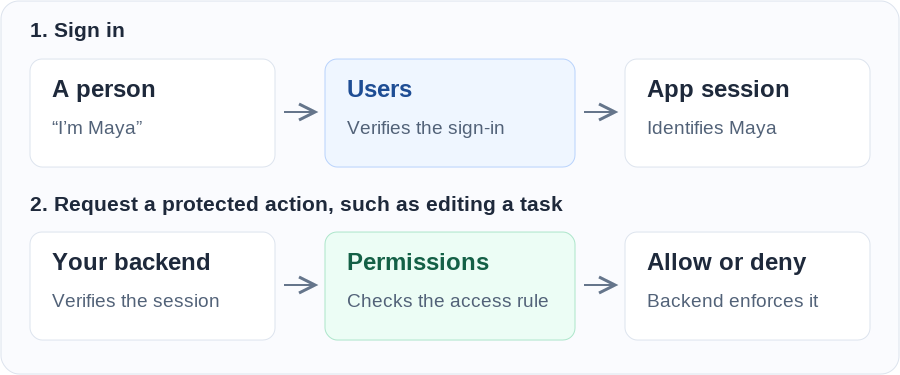
You can use Users for sign-in and add Permissions when you need access rules. If you already have authentication, you can also evaluate Permissions with your existing identity provider.
What you'll configure
- Your app's origin, such as
http://localhost:3000, so browser calls to the Users API are allowed. - Sign-in methods that your deployment supports and that you choose to enable.
- Callback URLs for flows that send a user away and return them to your app, such as Google sign-in.
- Account access rules, including who may administer other users.
Start with a single sign-in method. Add the others once the basic flow works.
Owner bootstrap
The first deployment administrator is configured during setup. That account manages your app's Users service; it is separate from ordinary app-user accounts. Administrative operations require the right authority, even for someone who can successfully sign in.
Directions
Start with Get started. If you already have a deployment and can read its sign-in configuration, continue to Add sign-in.