

How the pieces fit
Imagine you're building a project tracker. People sign in, join a team, and create tasks. Some can manage the team; others can only work on its projects.
Your app owns the projects and tasks. SaaSLayer can handle the accounts and access checks around them.
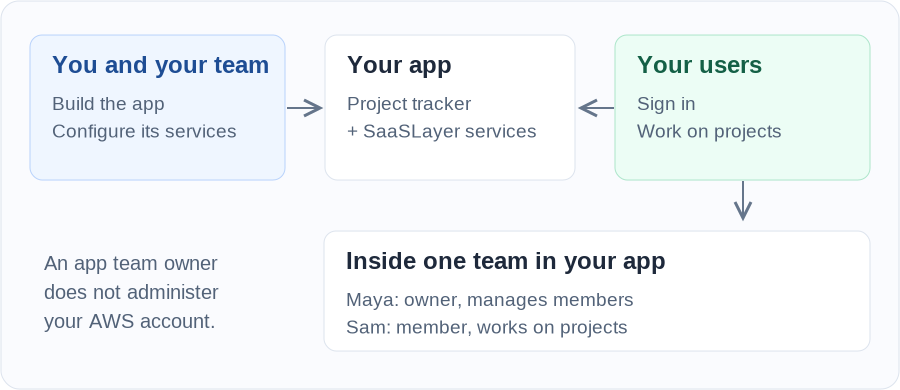
Customer Admins vs End Users
There are two different kinds of administration to keep in mind:
- You run the app. You configure its services, choose sign-in methods and manage the deployment. The docs sometimes call you a Customer Admin.
- Your users use the app. They sign in and work with its data. The docs call them End Users. One might be a team owner in your app; another might be a member with fewer permissions.
A team owner in your project tracker doesn't automatically get access to your AWS account or your SaaSLayer deployment settings. Those are separate jobs.
If you're building a small app on your own, you might do all the setup yourself. You don't need a separate person for every label.
Sign-in and permissions answer different questions
Users checks who someone is. For example, Maya signs in with her email and password. Your app receives a session that identifies her.
Permissions checks what she's allowed to do. For example, Maya can read projects in her team, but only the owner can invite more people.
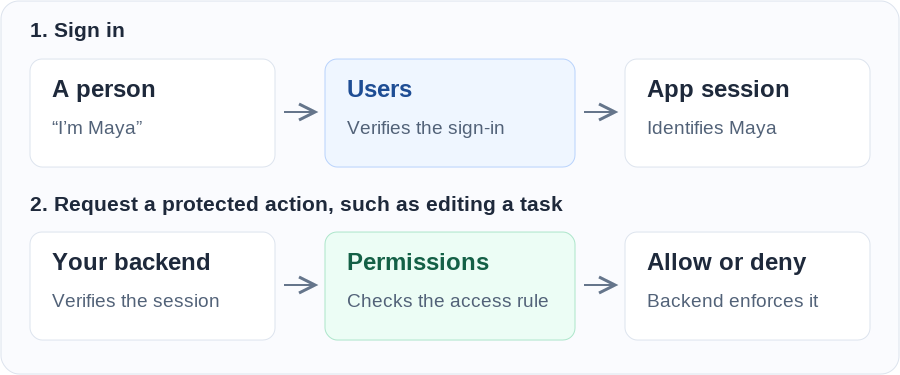
Your backend must enforce access rules before reading or changing protected data. Hiding a button in the UI makes the app clearer, but the server still needs to reject requests the person isn't allowed to make.
Product concepts vs authorization concepts
Use the words that make sense in your app: team, workspace, shop or project. You then map those to the access model.
| In a project tracker | What it means for access |
|---|---|
| A team | A boundary around the people and data that belong together. |
| An owner or member | A role: a set of things someone is allowed to do. |
| A project | Something your app protects with permission checks. |
| “Can Maya edit this task?” | An access decision your backend makes before changing the task. |
The Permissions guides explain the exact concepts and APIs when you're ready to implement those checks. You don't need to memorize them before adding sign-in.
A few terms you'll see later
| Term | Plain meaning |
|---|---|
| Service | One building block, such as Users or Permissions. |
| Deployment / instance | A running copy of the services for an app or environment. |
| Customer | You or your company using SaaSLayer. Your app's own customers are a separate audience. |
| Console | Where you manage your SaaSLayer setup. |
| Control plane | The SaaSLayer system that arranges deployments and updates. You use the CLI or console to work with it. |
| UI component / widget | A ready-made screen or part of a screen you put in your app. |
Next, choose where the services run or start with Users.